

Go from nothing to a published article in a few minutes: create an API key, list your articles, then create, publish and delete an article. Each step shows the request and the real response, and the end of the page has the whole thing as one program in Node.js, Python and PHP.
Before you start
You need to be an Owner or Admin of the help center: only they can create API keys. The API works on every plan.
You need
curlfor the steps. For the program at the end, use Node.js 18 or later, Python 3.8 or later, or PHP 8 with the curl extension. None of them needs extra packages.Step 5 publishes a real article, and step 6 deletes it again. If you have a help center for testing, use it.
Step 1: Create an API key
In the dashboard, click the gear icon, then Settings. Under API keys, click New key, name the key, pick the Read & write scope and click Create key. Then click Copy. For every option, see Create an API key.
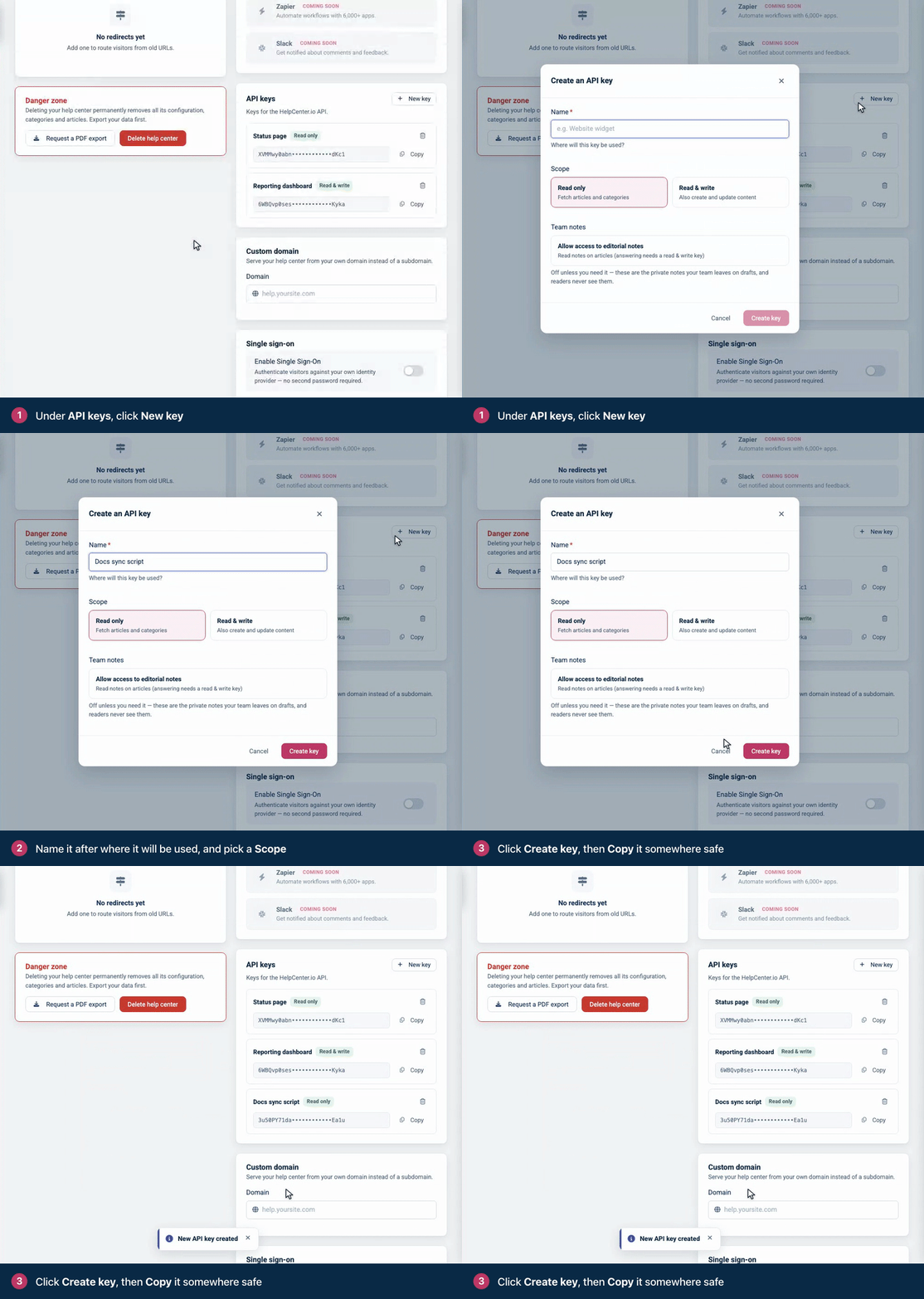
A key works with the help center it was created in, and only there.
Step 2: Keep the key in an environment variable
Every example in these docs reads the key from HELPCENTER_API_KEY, so it never appears in your code:
export HELPCENTER_API_KEY="paste-your-key-here"Keep keys on your computer or your server. Never put one in code that runs in a browser, or commit it to a repository.
Step 3: List your articles
Send the key in the apikey header. Also send Accept: application/json on every request, so that errors come back as JSON too:
curl "https://api.helpcenter.io/v1/articles?limit=2" \
  -H "apikey: $HELPCENTER_API_KEY" \
  -H "Accept: application/json"
The response lists the two most recently updated articles, drafts included, and a meta block for paging. Here each article is trimmed to a few fields; step 4 shows the full article object:
{
  "status": "success",
  "articles": [
    {
      "id": 521,
      "title": {"en": "Download your invoices"},
      "category_id": 316,
      "published": false,
      "updated_at": "2026-09-30 08:19:58"
    },
    {
      "id": 522,
      "title": {"de": "Passwort zurücksetzen", "en": "Reset your password"},
      "category_id": 293,
      "published": true,
      "updated_at": "2026-09-30 08:19:58"
    }
  ],
  "meta": {"page": 1, "per_page": 2, "total_pages": 57, "items_count": 114}
}
A title is a map keyed by language code, never a bare string. The same goes for slug and content. published says whether the article is published or a draft.
Step 4: Create a draft
Send the title and the HTML content in your help center's default language, and the id of a category. GET /v1/categories lists your categories. Leave category_id out to file the article under Uncategorized.
curl https://api.helpcenter.io/v1/articles \
  -H "apikey: $HELPCENTER_API_KEY" \
  -H "Accept: application/json" \
  -H "Content-Type: application/json" \
  -d '{
    "title": { "en": "Pay by bank transfer" },
    "content": { "en": "<p>You can pay any invoice by bank transfer. Use the invoice number as the payment reference.</p>" },
    "category_id": 316
  }'
The API answers 201 Created with the new article:
{
  "status": "success",
  "action": "created",
  "article": {
    "id": 735,
    "external_id": null,
    "title": {"en": "Pay by bank transfer"},
    "slug": {"en": "pay-by-bank-transfer"},
    "author": {"id": 412, "name": "Maya Chen", "avatar": null},
    "content": {
      "en": "<p>You can pay any invoice by bank transfer. Use the invoice number as the payment reference.</p>"
    },
    "category_id": 316,
    "categories": [],
    "type": null,
    "published": false,
    "has_staged_changes": false,
    "staged_locales": [],
    "staged_updated_at": null,
    "visibility": "public",
    "share_token": null,
    "views": null,
    "audio_file": null,
    "metadata": {"title": {}, "description": {}},
    "ratings": {"thumbs_up": 0, "thumbs_down": 0, "love": 0},
    "published_translations": [],
    "shared_with": [],
    "created_at": "2026-09-30 08:23:12",
    "updated_at": "2026-09-30 08:23:12",
    "_links": {
      "view": {
        "method": "GET",
        "url": "https://acme.helpcenter.io/content/pay-by-bank-transfer"
      }
    }
  }
}
The article is a draft ("published": false), and HelpCenter.io made its slug from the title. In the response to a create, type and views are null; the next read shows "article" and 0.
If your help center's default language isn't English, replace en with its code, for example de. The API refuses language codes that aren't enabled on your help center.
Step 5: Publish it
Set published to true. Use the id from your response in place of 735:
curl -X PATCH https://api.helpcenter.io/v1/articles/735 \
  -H "apikey: $HELPCENTER_API_KEY" \
  -H "Accept: application/json" \
  -H "Content-Type: application/json" \
  -d '{ "published": true }'
The response carries the whole article again. Trimmed to the fields that changed and its address:
{
  "status": "success",
  "article": {
    "id": 735,
    "title": {"en": "Pay by bank transfer"},
    "type": "article",
    "published": true,
    "views": 0,
    "updated_at": "2026-09-30 08:23:12",
    "_links": {
      "view": {
        "method": "GET",
        "url": "https://acme.helpcenter.io/content/pay-by-bank-transfer"
      }
    }
  }
}
The article is live for readers now. _links.view.url is its address on your help center.
Step 6: Delete it
curl -X DELETE https://api.helpcenter.io/v1/articles/735 \
  -H "apikey: $HELPCENTER_API_KEY" \
  -H "Accept: application/json"
The response confirms the delete:
{
  "status": "success",
  "message": "Article moved to trash.",
  "article": {"id": 735, "deleted_at": "2026-09-30T08:23:12+00:00"}
}
The article leaves your help center and its search, and waits in the Trash. Anyone on your team who can edit articles can restore it from there: see Delete and restore articles.
The whole thing as one program
This program runs steps 3 to 6 in one go. It takes the first of your categories, and it stops with the API's answer if a request fails.
// Quickstart: list, create, publish and delete an article with the HelpCenter.io API.
// Node.js 18 or later, no dependencies. Run: node quickstart.js
const API = 'https://api.helpcenter.io/v1';

async function api(method, path, body) {
  const headers = { apikey: process.env.HELPCENTER_API_KEY, Accept: 'application/json' };
  if (body !== undefined) headers['Content-Type'] = 'application/json';

  const res = await fetch(API + path, {
    method,
    headers,
    body: body === undefined ? undefined : JSON.stringify(body),
  });
  const text = await res.text();
  if (!res.ok) throw new Error(`${method} ${path} failed with ${res.status}: ${text}`);
  return JSON.parse(text);
}

async function main() {
  // 1. List the two most recently updated articles.
  const list = await api('GET', '/articles?limit=2');
  console.log(`Your help center has ${list.meta.items_count} articles.`);
  for (const article of list.articles) {
    console.log(`- ${article.id}: ${JSON.stringify(article.title)}`);
  }

  // 2. Pick a category for the new article (0 files it under Uncategorized).
  const { categories } = await api('GET', '/categories?limit=1');
  const categoryId = categories.length > 0 ? categories[0].id : 0;

  // 3. Create a draft.
  const created = await api('POST', '/articles', {
    title: { en: 'Pay by bank transfer' },
    content: {
      en: '<p>You can pay any invoice by bank transfer. '
        + 'Use the invoice number as the payment reference.</p>',
    },
    category_id: categoryId,
  });
  const id = created.article.id;
  console.log(`Created draft ${id}.`);

  // 4. Publish it.
  const published = await api('PATCH', `/articles/${id}`, { published: true });
  console.log(`Published at ${published.article._links.view.url}`);

  // 5. Delete it. It moves to the Trash, where you can restore it.
  const deleted = await api('DELETE', `/articles/${id}`);
  console.log(`${deleted.message} Deleted at ${deleted.article.deleted_at}.`);
}

main().catch((err) => {
  console.error(err.message);
  process.exit(1);
});
# Quickstart: list, create, publish and delete an article with the HelpCenter.io API.
# Python 3.8 or later, standard library only. Run: python3 quickstart.py
import json
import os
import sys
import urllib.error
import urllib.request
API = "https://api.helpcenter.io/v1"
def api(method, path, body=None):
headers = {"apikey": os.environ["HELPCENTER_API_KEY"], "Accept": "application/json"}
data = None
if body is not None:
data = json.dumps(body).encode("utf-8")
headers["Content-Type"] = "application/json"
request = urllib.request.Request(API + path, data=data, method=method, headers=headers)
try:
with urllib.request.urlopen(request) as response:
return json.load(response)
except urllib.error.HTTPError as err:
sys.exit(f"{method} {path} failed with {err.code}: {err.read().decode()}")
def main():
# 1. List the two most recently updated articles.
listing = api("GET", "/articles?limit=2")
print(f"Your help center has {listing['meta']['items_count']} articles.")
for article in listing["articles"]:
print(f"- {article['id']}: {json.dumps(article['title'], ensure_ascii=False)}")
# 2. Pick a category for the new article (0 files it under Uncategorized).
categories = api("GET", "/categories?limit=1")["categories"]
category_id = categories[0]["id"] if categories else 0
# 3. Create a draft.
created = api("POST", "/articles", {
"title": {"en": "Pay by bank transfer"},
"content": {
"en": "<p>You can pay any invoice by bank transfer. "
"Use the invoice number as the payment reference.</p>"
},
"category_id": category_id,
})
article_id = created["article"]["id"]
print(f"Created draft {article_id}.")
# 4. Publish it.
published = api("PATCH", f"/articles/{article_id}", {"published": True})
print(f"Published at {published['article']['_links']['view']['url']}")
# 5. Delete it. It moves to the Trash, where you can restore it.
deleted = api("DELETE", f"/articles/{article_id}")
print(f"{deleted['message']} Deleted at {deleted['article']['deleted_at']}.")
if __name__ == "__main__":
main()<?php
// Quickstart: list, create, publish and delete an article with the HelpCenter.io API.
// PHP 8 or later with the curl extension. Run: php quickstart.php
const API = 'https://api.helpcenter.io/v1';
function api(string $method, string $path, ?array $body = null): array
{
$headers = ['apikey: ' . getenv('HELPCENTER_API_KEY'), 'Accept: application/json'];
$ch = curl_init(API . $path);
curl_setopt($ch, CURLOPT_CUSTOMREQUEST, $method);
curl_setopt($ch, CURLOPT_RETURNTRANSFER, true);
if ($body !== null) {
$headers[] = 'Content-Type: application/json';
curl_setopt($ch, CURLOPT_POSTFIELDS, json_encode($body));
}
curl_setopt($ch, CURLOPT_HTTPHEADER, $headers);
$raw = curl_exec($ch);
$status = curl_getinfo($ch, CURLINFO_RESPONSE_CODE);
if ($raw === false || $status >= 400) {
fwrite(STDERR, "$method $path failed with $status: $raw\n");
exit(1);
}
return json_decode($raw, true);
}
// 1. List the two most recently updated articles.
$list = api('GET', '/articles?limit=2');
echo "Your help center has {$list['meta']['items_count']} articles.\n";
foreach ($list['articles'] as $article) {
$title = json_encode($article['title'], JSON_UNESCAPED_UNICODE);
echo "- {$article['id']}: $title\n";
}
// 2. Pick a category for the new article (0 files it under Uncategorized).
$categories = api('GET', '/categories?limit=1')['categories'];
$categoryId = $categories ? $categories[0]['id'] : 0;
// 3. Create a draft.
$created = api('POST', '/articles', [
'title' => ['en' => 'Pay by bank transfer'],
'content' => [
'en' => '<p>You can pay any invoice by bank transfer. '
. 'Use the invoice number as the payment reference.</p>',
],
'category_id' => $categoryId,
]);
$id = $created['article']['id'];
echo "Created draft $id.\n";
// 4. Publish it.
$published = api('PATCH', "/articles/$id", ['published' => true]);
echo "Published at {$published['article']['_links']['view']['url']}\n";
// 5. Delete it. It moves to the Trash, where you can restore it.
$deleted = api('DELETE', "/articles/$id");
echo "{$deleted['message']} Deleted at {$deleted['article']['deleted_at']}.\n";Save it as quickstart.js, quickstart.py or quickstart.php, and run it with your key in the environment:
export HELPCENTER_API_KEY="paste-your-key-here"
node quickstart.js
It prints something like this:
Your help center has 114 articles.
- 522: {"de":"Passwort zurücksetzen","en":"Reset your password"}
- 521: {"en":"Download your invoices"}
Created draft 751.
Published at https://acme.helpcenter.io/content/pay-by-bank-transfer
Article moved to trash. Deleted at 2026-09-30T08:26:24+00:00.
Troubleshooting
Response | Cause and fix |
|---|---|
| The key is missing, mistyped or deleted. Check that |
| The key is Read only. Create a Read & write key. |
| English isn't a language of your help center. Use your default language's code. |
| No category with that id exists in this help center. Take an id from |
| The request had no |
Every other status and code is explained in Errors.
What to read next
Requests and responses: headers, languages, dates and HTML or Markdown content.
Articles: every field and every article endpoint.
API keys: scopes, team notes access, and keeping keys safe.
Rate limits: how many requests you can make, and how to wait when you hit a limit.