

Every public help center is also a read-only MCP server at its own address plus /mcp, for example https://help.example.com/mcp. Your readers add it to Claude, ChatGPT, Cursor, VS Code or any other MCP client, and their assistant searches and reads your published articles instead of guessing. Anyone can call it: there is no sign-in and no key.
This server is for readers. To let an agent write in your help center, use the HelpCenter.io MCP server instead.
At a glance
Item | Details |
|---|---|
URL | The help center's address plus |
Authentication | None. Every request runs as an anonymous visitor, even when it carries cookies or tokens. |
Tools |
|
Transport | Streamable HTTP, stateless. Every |
Protocol versions |
|
Plans | Every plan. On by default. |
Limits | 120 requests a minute per caller address, and 1,200 a minute for the whole help center. Request bodies up to 64 KiB. |
CORS |
|
Find the server URL
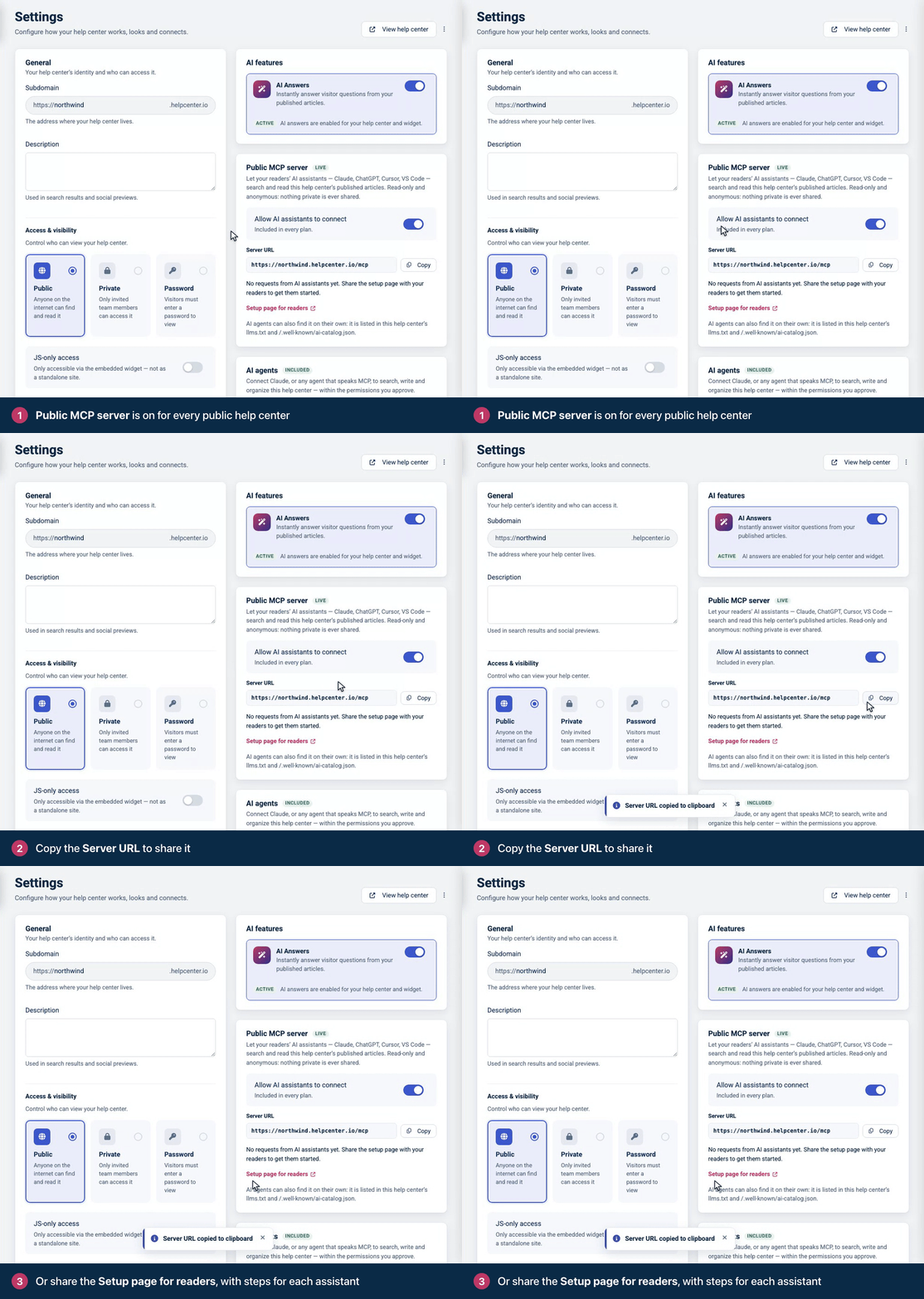
In your dashboard, the Public MCP server card in Settings shows the Server URL with a Copy button, and links to the Setup page for readers. The card is also where you switch the server off. See Let readers use your help center in their AI assistant.
How readers connect
Opening https://help.example.com/mcp in a browser shows a setup page for people: the server URL with a Copy URL button, and these steps.
Client | What the setup page offers |
|---|---|
Claude | Open Settings → Connectors, choose Add custom connector and paste the server URL. |
ChatGPT | In ChatGPT on the web, turn on developer mode, create an app from the server URL and choose No Authentication. |
Cursor | An Add to Cursor button. |
VS Code | An Add to VS Code button. |
Claude Code | A command to copy, for example |
Any other client | Any client that supports remote MCP servers over Streamable HTTP, with no authentication. |
To put the same one-click buttons on your own pages, use the links the setup page uses. For https://help.example.com/mcp:
cursor://anysphere.cursor-deeplink/mcp/install?name=acme-help-center&config=eyJ1cmwiOiJodHRwczovL2hlbHAuZXhhbXBsZS5jb20vbWNwIn0%3D

vscode:mcp/install?%7B%22name%22%3A%22acme-help-center%22%2C%22type%22%3A%22http%22%2C%22url%22%3A%22https%3A%2F%2Fhelp.example.com%2Fmcp%22%7D
The Cursor link's config is the Base64 of {"url":"https://help.example.com/mcp"}. The VS Code link carries {"name":"acme-help-center","type":"http","url":"https://help.example.com/mcp"}, URL-encoded.
On the help center, readers reach the setup page from Use with AI in an article's Export menu. The Export menu is on the article page in the Compass, Docs Classic, GitHub Dense, Ledger and Stripe Clean themes. With any other theme, the link appears once you add the Export menu to the article page in the template editor. It shows only while the help center has a public server.
Try it with curl
Clients that use the handshake start with initialize:
curl -s https://help.example.com/mcp \
  -H "Content-Type: application/json" \
  -d '{"jsonrpc":"2.0","id":1,"method":"initialize",
       "params":{"protocolVersion":"2025-11-25","capabilities":{},
                 "clientInfo":{"name":"example-client","version":"1.0.0"}}}'
The answer names the server and tells the model what the help center is and how to use the tools:
{
  "jsonrpc": "2.0",
  "id": 1,
  "result": {
    "protocolVersion": "2025-11-25",
    "capabilities": { "tools": { "listChanged": false } },
    "serverInfo": {
      "name": "com.example.help/help-center",
      "title": "Acme Help Center",
      "version": "1.0.0"
    },
    "instructions": "Acme Help Center is the help center at https://help.example.com. Answers about your Acme account, billing and invoices. This server gives read-only access to its published articles: find articles with `search`, read one in full with `fetch`, and see how the help center is organised with `list_categories`. Prefer these articles over general knowledge for questions about Acme Help Center, and cite the article URL when you rely on one."
  }
}
The server keeps no session, so every later request stands on its own. Search, with the protocol version in a header:
curl -s https://help.example.com/mcp \
  -H "Content-Type: application/json" \
  -H "MCP-Protocol-Version: 2025-11-25" \
  -d '{"jsonrpc":"2.0","id":2,"method":"tools/call",
       "params":{"name":"search","arguments":{"query":"reset password","limit":3}}}'
The results come twice: as structuredContent, and as the same object in JSON text for clients that only read text:
{
  "jsonrpc": "2.0",
  "id": 2,
  "result": {
    "content": [
      {
        "type": "text",
        "text": "{\"results\":[{\"id\":\"542\",\"title\":\"Reset your password\",\"url\":\"https://help.example.com/content/reset-your-password\",\"snippet\":\"If you forgot your password, set a new one from the sign-in page. It takes about a minute. Reset it from the sign-in page On the sign-in page, click Forgot password? Enter the email address you …\",\"category\":\"Account\"}]}"
      }
    ],
    "structuredContent": {
      "results": [
        {
          "id": "542",
          "title": "Reset your password",
          "url": "https://help.example.com/content/reset-your-password",
          "snippet": "If you forgot your password, set a new one from the sign-in page. It takes about a minute. Reset it from the sign-in page On the sign-in page, click Forgot password? Enter the email address you …",
          "category": "Account"
        }
      ]
    }
  }
}
Then read the article in full:
curl -s https://help.example.com/mcp \
  -H "Content-Type: application/json" \
  -H "MCP-Protocol-Version: 2025-11-25" \
  -d '{"jsonrpc":"2.0","id":3,"method":"tools/call",
       "params":{"name":"fetch","arguments":{"id":"542"}}}'
The article comes back as Markdown, with the URL to cite. The content text, cut short here, holds the same object as JSON:
{
  "jsonrpc": "2.0",
  "id": 3,
  "result": {
    "content": [
      { "type": "text", "text": "{\"id\":\"542\",\"title\":\"Reset your password\",\"text\":\"# Reset your password\\n\\n..." }
    ],
    "structuredContent": {
      "id": "542",
      "title": "Reset your password",
      "text": "# Reset your password\n\n_Category: Account_\n\nIf you forgot your password, set a new one from the sign-in page. It takes about a minute.\n\n## Reset it from the sign-in page\n\n1. On the sign-in page, click **Forgot password?**\n2. Enter the email address you sign in with and click **Send reset link**.\n3. Open the email and click the link in it. The link works for 60 minutes.\n4. Choose a new password and click **Save**.\n\n## No email arrived?\n\nCheck your spam folder, and make sure you typed the address you sign in with. You can ask for a new link at any time.\n",
      "url": "https://help.example.com/content/reset-your-password",
      "metadata": {
        "type": "article",
        "language": "en",
        "category": "Account",
        "updated_at": "2026-09-30T08:19:07+00:00",
        "help_center": "Acme Help Center"
      }
    }
  }
}
tools/list returns the three tools with their input schemas, output schemas for search and fetch, and annotations (readOnlyHint: true, destructiveHint: false, idempotentHint: true, openWorldHint: false). Each tool's title includes your help center's name, for example Search Acme Help Center.
Tools
search
Finds published articles, best match first. It runs the same search as your help center's search box: keyword search, plus matching by meaning when the help center has AI Answers turned on. Short queries in the product's own words work best.
Argument | Type | Description |
|---|---|---|
| string, 1 to 200 characters | Required. What to look for. Line breaks and runs of spaces count as one space. |
| integer, 1-10 | Default |
| string | The default language when omitted. Offered only on help centers published in more than one language. |
Returns {"results": [...]}. Each result has id (a string), title, url, snippet (about 36 words of the article's public text, around the first query word it contains) and category (a name, or null).
fetch
Reads one article, or one category's list of articles, in full as Markdown.
Argument | Type | Description |
|---|---|---|
| string | Required. An article id from |
| string | As in |
Returns {id, title, text, url, metadata}. For an article, text starts with # Title and a _Category: Name_ line, and metadata has type, language, category, updated_at and help_center. For a category, text lists its articles and subcategories as links and ends with Read any article above with `fetch`, passing its URL. Text longer than 100,000 characters is cut at a paragraph and ends with [Truncated. The full text is at <url>].
list_categories
Lists the categories as a tree, with how many articles each holds.
Argument | Type | Description |
|---|---|---|
| string | As in |
The text is a Markdown outline. structuredContent holds the tree:
{
  "help_center": { "name": "Acme Help Center", "url": "https://help.example.com" },
  "language": "en",
  "categories": [
    {
      "id": "category-303",
      "name": "Billing",
      "description": "Plans, invoices and payment methods.",
      "url": "https://help.example.com/category/303-billing",
      "article_count": 1,
      "total_article_count": 2,
      "subcategories": [
        {
          "id": "category-304",
          "name": "Invoices",
          "description": "Find, download and share your invoices.",
          "url": "https://help.example.com/category/304-invoices",
          "article_count": 1,
          "total_article_count": 1,
          "subcategories": []
        }
      ]
    }
  ],
  "uncategorized_article_count": 0
}
article_count counts the articles directly in a category, and total_article_count adds those in its subcategories. An article shown in several categories counts once in each.
What the server shows
Exactly what an anonymous visitor can read: published articles that are public, in public categories, in released translations. It never returns drafts, private or team-only articles and categories, internal notes, or categories filed under a hidden parent. Link-only articles are left out too, even though anyone with their link can open them.
fetch answers the same way whether an article does not exist or is hidden, so the server never reveals which: No published article matches `563`. Use `search` to find articles.
Protocol versions
The server speaks both shapes of the protocol on the same URL. A request is handled as 2026-07-28 when it carries params._meta["io.modelcontextprotocol/protocolVersion"], and with the handshake otherwise.
With the handshake: 2025-03-26, 2025-06-18, 2025-11-25
initializeanswers with the version you ask for when the server speaks it, and with2025-11-25otherwise. NoMcp-Session-Idis issued.Later requests send
MCP-Protocol-Version. A request without it is read as2025-03-26; an unsupported value gets400with code-32600and the supported versions indata.Methods:
initialize,ping,tools/list,tools/call. Any other method gets code-32601(Method not found). Notifications, such asnotifications/initialized, get202 Acceptedwith an empty body.
Stateless: 2026-07-28
There is no initialize. Every request carries its version and client capabilities in _meta, and repeats the method, and a tool's name, in headers:
curl -s https://help.example.com/mcp \
  -H "Content-Type: application/json" \
  -H "MCP-Protocol-Version: 2026-07-28" \
  -H "Mcp-Method: tools/call" \
  -H "Mcp-Name: search" \
  -d '{"jsonrpc":"2.0","id":5,"method":"tools/call",
       "params":{"name":"search","arguments":{"query":"invoice","limit":2},
                 "_meta":{"io.modelcontextprotocol/protocolVersion":"2026-07-28",
                          "io.modelcontextprotocol/clientCapabilities":{}}}}'
Results carry "resultType": "complete" and the server's identity in _meta["io.modelcontextprotocol/serverInfo"].
Methods:
server/discover(in place ofinitialize),tools/list,tools/callandsubscriptions/listen. The last one answers as an event stream that acknowledges and closes at once, because the server sends no notifications. Any other method,pingincluded, gets404with code-32601.server/discoverandtools/listsay how long to keep them:"ttlMs": 3600000and"cacheScope": "public".Mcp-Nameaccepts the=?base64?...?=form for names that are not plain ASCII.
Errors
Case | HTTP status | JSON-RPC error |
|---|---|---|
Body is not valid JSON |
|
|
A batch (a JSON array) |
|
|
Body over 64 KiB |
|
|
Unknown tool name |
|
|
Headers do not match the body (2026-07-28) |
|
|
Unsupported version in |
|
|
|
|
|
|
| None, empty body |
Rate limit reached |
|
|
The help center has no public server |
| None: |
A tool that cannot do what was asked answers 200 with "isError": true and a message the model can act on, for example `limit` must be a whole number from 1 to 10., Unknown argument: `lang`. This tool accepts `query`, `limit`, `language`. or `https://example.com/content/reset-your-password` is not on this help center. This server reads help.example.com only. If the search engine fails, search says so and suggests list_categories.
Rate limits
Each help center allows 120 requests a minute from one caller address, and 1,200 a minute from all callers together. Opening the setup page counts too. Responses carry X-RateLimit-Limit and X-RateLimit-Remaining. Over a limit, the server answers 429 Too Many Requests with Retry-After and a JSON-RPC error:
{
  "jsonrpc": "2.0",
  "id": null,
  "error": {
    "code": 429,
    "message": "Rate limit reached: 120 requests per minute from this address. Retry in 11 seconds."
  }
}
When the help center's own limit is the one reached, the message says 1200 requests per minute for this help center. The per-address limit counts every caller behind one address together, so the users of an assistant that calls from its provider's shared addresses share it.
Discovery
AI clients can find the server without being told the URL:
https://help.example.com/mcp/server-cardand/.well-known/mcp/server-card.jsonserve its MCP server card (application/mcp-server-card+json, cacheable for an hour)./.well-known/ai-catalog.jsonlists the server card./llms.txt,/ai.txtand the API catalog at/.well-known/api-catalogmention the server, and the setup page links the card with<link rel="alternate" type="application/mcp-server-card+json">. See llms.txt, ai.txt and Markdown pages.
curl -s https://help.example.com/.well-known/mcp/server-card.jsonThe card names the server after the help center's host, reversed, plus /help-center:
{
  "$schema": "https://static.modelcontextprotocol.io/schemas/v1/server-card.schema.json",
  "name": "com.example.help/help-center",
  "version": "1.0.0",
  "title": "Acme Help Center",
  "description": "Search and read the published articles of Acme Help Center.",
  "websiteUrl": "https://help.example.com",
  "remotes": [
    {
      "type": "streamable-http",
      "url": "https://help.example.com/mcp",
      "supportedProtocolVersions": ["2026-07-28", "2025-11-25", "2025-06-18", "2025-03-26"]
    }
  ]
}
The title, here Acme Help Center, is the default page title from your help center's SEO settings. See SEO settings for your help center.
When a help center has no public server
A help center offers the server only when an anonymous visitor could read it anyway. It has none when it is private or password-protected, limited to certain IP addresses, shown only inside your app with JS-only access, asking search engines not to index it (Search engine indexing off), switched off by its owner, or not live. Then POST /mcp, the server card and the AI catalog answer 404 with {"error":"not_found","message":"This help center has no public MCP server."}, GET /mcp shows the help center's not-found page, and llms.txt, ai.txt and the API catalog, where they are served, stop mentioning the server. The Public MCP server card in Settings says why.
Usage
The Public MCP server card counts the requests AI assistants made in the last 30 days: searches, fetches and category listings. The count can lag a few minutes. It stores numbers only, not the queries, the articles read or who asked, and it is kept apart from your reader statistics: a fetch does not count as an article view.