

The widget, FAQ sections and the embedded help center load scripts, frames and data from HelpCenter.io. If your site sends a Content Security Policy, it must allow them. This page lists the exact hosts and directives, the other browser settings that matter, and how Embedding origins decides where your help center can appear.
HelpCenter.io hosts
Host | What your page loads from it |
|---|---|
| The widget's loader, |
| The widget's frame. Requests your page makes for the widget's configuration, its proactive messages and your FAQ sections. |
| Usage statistics your page sends for the widget and FAQ sections. |
Your help center's address | The embedded help center: |
These hosts are the same for every help center. A custom domain changes only your help center's own address.
The widget
Add these sources to your policy:
Content-Security-Policy: script-src 'self' 'nonce-RANDOM' https://helpcenter.io; frame-src https://embed.helpcenter.io; connect-src 'self' https://embed.helpcenter.io https://metrics.helpcenter.ioDirective | Source | Without it |
|---|---|---|
|
| Nothing loads. |
| A nonce or hash for the snippet, or | The dashboard's snippet is an inline script, so it's blocked and nothing loads. You can also move it out of the page, below. |
|
| The widget never appears. |
|
| The widget appears, but proactive messages never show, and usage statistics aren't recorded. |
|
| The widget works, but its usage statistics aren't recorded. |
With a nonce, your server adds a new random value to each response's policy and to the snippet's <script> tag, for example <script nonce="RANDOM" type="text/javascript">. To avoid inline scripts altogether, set window.hcOptions in one of your own script files and load init.js with a script tag; see Widget installation and options:
<script src="/js/help-widget-options.js"></script>
<script src="https://helpcenter.io/js/init.js" async></script>
The widget's frame is its own document: its fonts, styles and images don't count against your page's policy.
FAQ sections
FAQ sections render on your page itself, so their styles and images do count against your policy. On top of the widget's sources, allow inline styles, and the hosts the images in your FAQ answers load from:
Content-Security-Policy: script-src 'self' 'nonce-RANDOM' https://helpcenter.io; frame-src https://embed.helpcenter.io; connect-src 'self' https://embed.helpcenter.io https://metrics.helpcenter.io; style-src 'self' 'unsafe-inline'; img-src 'self' https://images.example.comWithout 'unsafe-inline' in style-src, the questions and answers still load, but without their styles. To see where an answer's images load from, open the article on your help center and check the image's address.
The embedded help center
For the full help center in a frame, allow the embed script, the inline script that sets subdomain, and your help center's address:
Content-Security-Policy: script-src 'self' 'nonce-RANDOM' https://helpcenter.io; frame-src https://acme.helpcenter.ioGive the inline script the nonce, <script nonce="RANDOM">, or set subdomain in one of your own script files. With a custom domain, put it in frame-src instead, such as https://help.acme.com. On a private help center, the frame also visits your Login URL to sign readers in, so add its origin to frame-src as well, such as https://app.example.com. The embed itself is covered in Embed your help center in your app.
Other browser settings
Referrer-Policy. Keep at least your page's origin in the referrer sent to other sites, as the default policy,
strict-origin-when-cross-origin, does. Withno-referrerorsame-origin, the widget doesn't render in Firefox, and its console says "Parent domain not found. Cannot render the widget." An embedded help center with JS-only access on shows "Help center not available."Cookies. The widget sets no cookies on your site, and its sign-in with a JWT uses none, so blocking third-party cookies doesn't affect it. An embedded private help center keeps readers signed in with a cookie, which works only when your page and your help center share a site; see Embed your help center in your app.
Storage. On your page, the widget keeps two identifiers for usage statistics in
sessionStorage,hc_session_idandhc_journey_id. With proactive messages active, it also keeps when each message was shown inlocalStorage, underhcw:nudge:followed by your widget ID.
Embedding origins
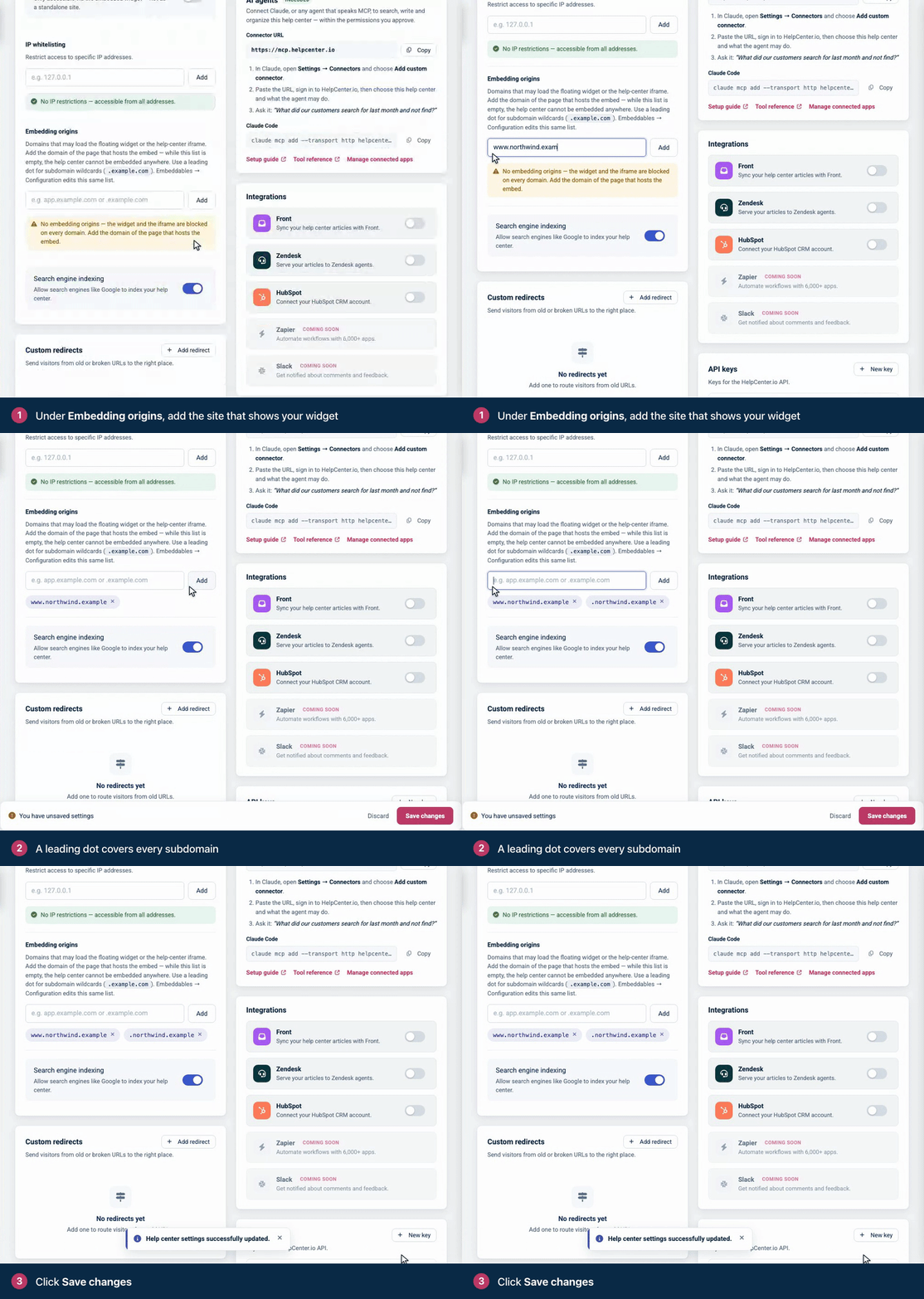
Embedding origins is the list of hosts where your help center may appear. Owners and Admins edit it in Settings → General, or in Embeddables → Widget → Configuration; see Choose which websites can show the widget.
How entries match
Hosts only. A full address such as
https://www.example.com:8443/helpis saved aswww.example.com.Exact hosts.
example.comandwww.example.comare different entries.A leading dot for subdomains.
.example.comcoversexample.comand every subdomain of it. The widget doesn't recognize other wildcard forms, such as*.example.com.Ports, for the widget only. The widget ignores the port, so
localhostcovershttp://localhost:3000. The embedded help center needs anhttps://page on the standard port.An empty list blocks everything. With no entries, the widget and the embed are refused on every website.
What the list controls
Surface | What happens on a host that isn't in the list |
|---|---|
The widget | It doesn't render or take commands, and the frame's console says "Parent domain is not in the allowed list." followed by the host. It checks the host of the page it's placed on. |
Proactive messages | They don't load. |
The embedded help center | The browser refuses to show it. Every page around the frame must be in the list, not only the page that contains it. |
JS-only access | Following a link from that host to your help center shows "Embedding not allowed." |
FAQ sections have their own list of websites, Display on URLs, and are for public content. See Embed FAQ sections on your website.
The Embedding origins list decides where the help center can be shown, not who can read it. To limit who can read your articles, make your help center Private and sign readers in; see Sign readers into the widget with a JWT.
Your help center's frame-ancestors
Your help center's public pages tell browsers which pages may frame them. With Embedding origins set to localhost, 127.0.0.1 and app.example.com, every page answers with:
Content-Security-Policy: frame-ancestors 'self' localhost 127.0.0.1 app.example.comAn entry with a leading dot appears twice, as example.com *.example.com. With an empty list, the header is frame-ancestors 'none'. Sources without a scheme or port match only https:// pages on the standard port, which is why http://localhost:3000 can't show the embedded help center. After you save the list, the new header can take a couple of minutes to reach every visitor.
IP allow-list
When your help center allows only listed IP addresses (IP whitelisting in Settings; see Restrict access by IP address), visitors from other addresses can't read it anywhere:
The widget shows Not available on this network and "This help center can only be opened from approved networks. If you usually have access, connect to your organization's network or VPN and try again."
The widget's requests answer
403 Forbidden, and no token changes that:
{
  "status": "error",
  "message": "This help center is not available from your network.",
  "code": "SITE_IP_RESTRICTED"
}
On the help center itself, those visitors are sent to the HelpCenter.io sign-in page. Addresses must match exactly: the list has no ranges. It applies to everyone, including your team and readers who sign in with a JWT.
Troubleshooting
What you see | Cause | Fix |
|---|---|---|
No launcher, and "Parent domain is not in the allowed list." in the console | Your page's host isn't in Embedding origins. | Add the host the message names, and reload after a couple of minutes. |
No launcher, and a Content Security Policy error for | Your policy blocks | Allow |
No launcher, and a Content Security Policy error for | Your policy blocks the widget's frame. | Allow |
The widget works, but proactive messages never show, and the console has a | Your policy blocks requests to | Allow it in |
The widget works in Chrome and Safari but not in Firefox | Your page's | Use |
A FAQ section shows without its styles | Your policy blocks inline styles. | Add |
The embedded help center stays blank, with a | A page around the frame isn't in Embedding origins, or the page isn't | |
The widget says Not available on this network | Your IP allow-list doesn't include the visitor's address. | Add the address, or clear the list. |
The widget's frame loads, but the widget never appears, and its request answers | The | Copy the snippet again from Embeddables. |
More causes, from the account owner's side, are in The widget doesn't show up.