

An API key lets your own code call the HelpCenter.io REST API for one help center. Send it in the apikey header of every request to https://api.helpcenter.io/v1. It keeps working until you delete it.
curl https://api.helpcenter.io/v1/sites \
  -H "apikey: $HELPCENTER_API_KEY" \
  -H "Accept: application/json"
The response names the help center the key belongs to, and only that one:
{
  "status": "success",
  "sites": [
    {
      "id": 1234,
      "uuid": "8f14e45f-ceea-4f6a-9d3b-2c5e1a7b9c01",
      "name": "Acme Help",
      "subdomain": "acme",
      "domain": "acme.helpcenter.io",
      "url": "https://acme.helpcenter.io",
      "default_language": "en",
      "visibility": "public",
      "publicly_accessible": true,
      "languages": ["en"],
      "created_at": "2026-09-30 08:03:11"
    }
  ],
  "meta": {
    "items_count": 1
  }
}
Create a key
Who can do this: Owners and Admins of the help center · Plans: All plans
In the dashboard, click the gear icon, then Settings. Under API keys, click New key, give the key a Name that says where it will be used, pick a Scope, and click Create key. Leave Team notes off unless your integration works with your team's notes, and Design off unless it reads or changes your help center's design. The steps are in Create an API key.
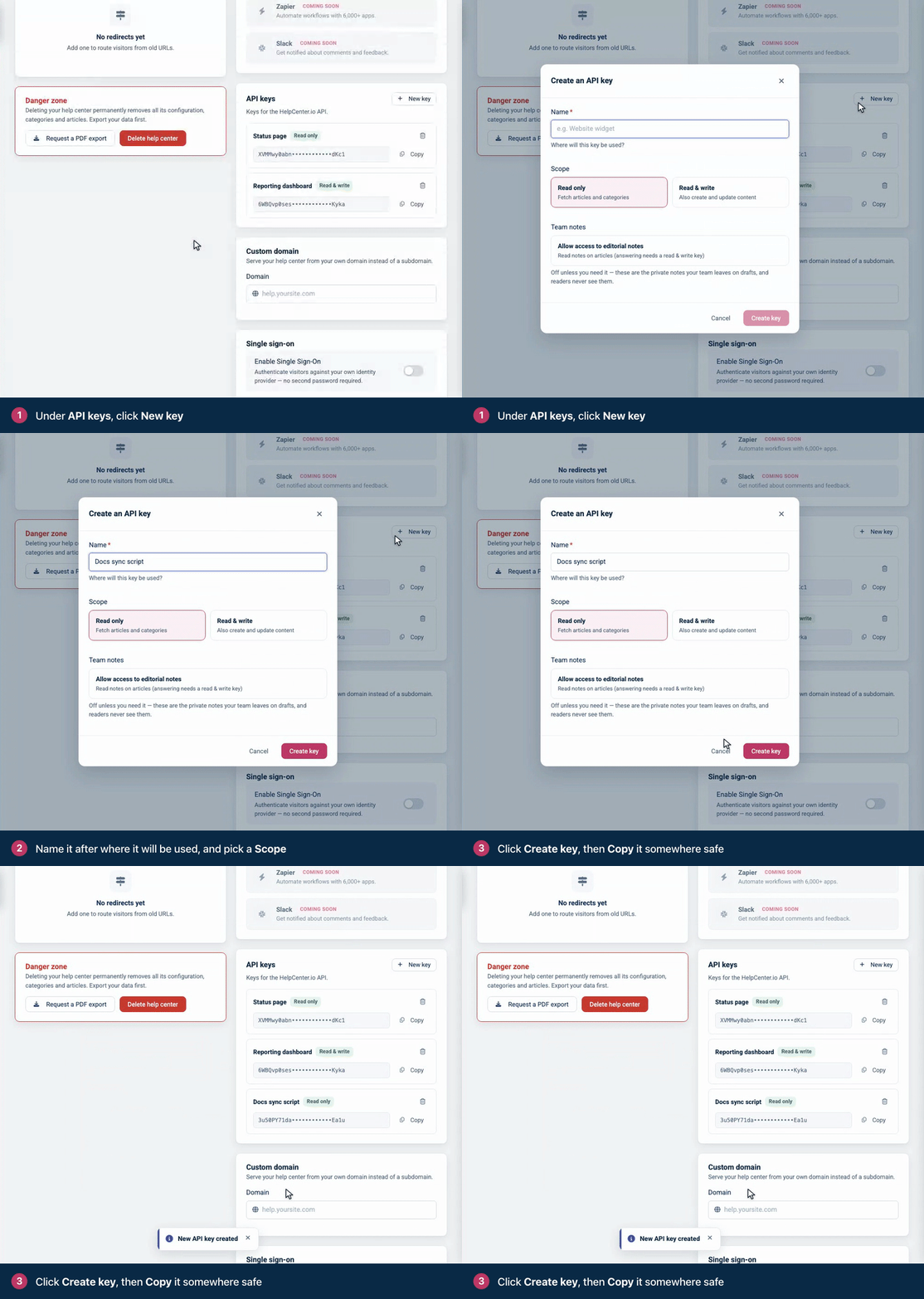
A key is a 64-character string. Click Copy and store it where your code reads its secrets, such as an environment variable or a secret manager. The samples on this site read it from HELPCENTER_API_KEY.
What a key can do
The scope you pick decides which endpoints the key can call. A key holds these scopes:
Option | Scopes | What the key can do |
|---|---|---|
Read only |
| Read articles, categories, images, comments, staged changes and versions, change sets, interface translations and exports, and read analytics. |
Read & write |
| Everything a Read only key can do, plus create, update and delete content, upload images, moderate comments, publish staged changes and change sets, and manage webhooks. |
Team notes (optional, off by default) |
| Read the private notes your team leaves on articles. With Read & write, also reply to them and resolve them. |
Design (optional, off by default) |
| Tick Allow access to the help center design to let the key read the help center's design. With Read & write, it can also change the design and publish it, custom CSS and scripts included. See Design API. |
A request outside the key's scopes fails with 403 Forbidden, and the message names the scope the key lacks:
{
  "status": "error",
  "code": "insufficient_scope",
  "message": "This action requires the content.write scope."
}
You choose the scope, Team notes access and Design access when you create a key, and you can't change them later: an existing key never gains design access. Team notes requests also need the person who created the key to have access to team notes in the help center, as an Owner, Admin, Editor or Translator; without it, they fail with 403 and the code notes_forbidden. Design requests need that person to be an Owner, Admin or Editor; otherwise they fail with 403 and the code design_forbidden.
One key, one help center
A key always acts on the help center it was created in. OAuth apps pick a help center with the X-HCio-Site header or the site query parameter; with an API key, both are ignored. To work with several help centers, create a key in each one, or use OAuth.
Send the key
Send the key in the
apikeyheader. The header name is not case-sensitive. The API reads the key from no other header or query parameter.Also send
Accept: application/json, so that errors come back as JSON (see Requests and responses).If a request carries both an
apikeyheader and anAuthorization: Bearertoken, only the key is read. A valid token doesn't rescue an invalid key: the request fails.Each key has its own rate limit budget. See Rate limits.
A missing, mistyped or deleted key gets 401 Unauthorized with this body. So does a key whose creator's HelpCenter.io account was deleted.
{
  "status": "unauthorized"
}
Check a key
This program reports which help center a key reaches and whether it can write. GET /v1/account returns kb.capabilities, with read and write set for the credential that calls it.
// Check which help center an API key reaches and whether it can write.
// Node.js 18 or later, no dependencies. Run: node check-key.js
const API = 'https://api.helpcenter.io/v1';

async function get(path) {
  const res = await fetch(API + path, {
    headers: { apikey: process.env.HELPCENTER_API_KEY, Accept: 'application/json' },
  });
  const text = await res.text();
  if (!res.ok) throw new Error(`GET ${path} failed with ${res.status}: ${text}`);
  return JSON.parse(text);
}

async function main() {
  const { sites } = await get('/sites');
  const { kb } = await get('/account');
  console.log(`This key works with help center ${sites[0].id} (${sites[0].url}).`);
  console.log(`Read: ${kb.capabilities.read ? 'yes' : 'no'}. Write: ${kb.capabilities.write ? 'yes' : 'no'}.`);
}

main().catch((err) => {
  console.error(err.message);
  process.exit(1);
});
# Check which help center an API key reaches and whether it can write.
# Python 3.8 or later, standard library only. Run: python3 check_key.py
import json
import os
import sys
import urllib.error
import urllib.request
API = "https://api.helpcenter.io/v1"
def get(path):
request = urllib.request.Request(
API + path,
headers={"apikey": os.environ["HELPCENTER_API_KEY"], "Accept": "application/json"},
)
try:
with urllib.request.urlopen(request) as response:
return json.load(response)
except urllib.error.HTTPError as err:
sys.exit(f"GET {path} failed with {err.code}: {err.read().decode()}")
sites = get("/sites")["sites"]
capabilities = get("/account")["kb"]["capabilities"]
print(f"This key works with help center {sites[0]['id']} ({sites[0]['url']}).")
print(
f"Read: {'yes' if capabilities['read'] else 'no'}. "
f"Write: {'yes' if capabilities['write'] else 'no'}."
)<?php
// Check which help center an API key reaches and whether it can write.
// PHP 8 or later with the curl extension. Run: php check-key.php
const API = 'https://api.helpcenter.io/v1';
function get(string $path): array
{
$ch = curl_init(API . $path);
curl_setopt($ch, CURLOPT_RETURNTRANSFER, true);
curl_setopt($ch, CURLOPT_HTTPHEADER, [
'apikey: ' . getenv('HELPCENTER_API_KEY'),
'Accept: application/json',
]);
$raw = curl_exec($ch);
$status = curl_getinfo($ch, CURLINFO_RESPONSE_CODE);
if ($raw === false || $status >= 400) {
fwrite(STDERR, "GET $path failed with $status: $raw\n");
exit(1);
}
return json_decode($raw, true);
}
$sites = get('/sites')['sites'];
$capabilities = get('/account')['kb']['capabilities'];
echo "This key works with help center {$sites[0]['id']} ({$sites[0]['url']}).\n";
echo 'Read: ' . ($capabilities['read'] ? 'yes' : 'no')
. '. Write: ' . ($capabilities['write'] ? 'yes' : 'no') . ".\n";With a Read & write key, it prints:
This key works with help center 1234 (https://acme.helpcenter.io).
Read: yes. Write: yes.
Manage your keys
You see only your own keys. Settings lists the keys you created, masked, each with its scope, a Team notes tag if it has notes access, and a Design tag if it has design access. You see and delete only your keys; other Owners and Admins see only theirs.
You can copy a key again. Copy copies the full key whenever you need it.
Deleting is immediate. Click the trash icon next to the key, then Delete key. The next request with that key gets
401.Keys don't expire, and there is no rotate button. To replace a key, create a new one, switch your integration to it, then delete the old one.
When someone leaves your team. Before you remove someone, ask them to delete the keys they created, and replace any integration that used them.
Keys go with their help center. When a help center is deleted, its keys stop working.
Keep keys secret
Use keys on servers, in scheduled jobs and in CI. Never put a key in browser JavaScript, a mobile app or a code repository: anyone who can load the page, install the app or read the repository can read the key.
The widget never needs an API key, and neither does single sign-on: signing readers in uses a JWT (see Sign readers into the widget with a JWT and How JWT single sign-on works).
Create one key per integration, so that you can delete one without breaking the others, and pick Read only unless the integration writes.
If a key leaks, create a replacement, switch to it, and delete the leaked key.
A Read & write key with Design access can change the custom CSS and scripts that every visitor's browser runs once the design is published. Treat it like an admin password, and delete it when the work is done.
What a key can't do
Reach another help center. Each key works with the help center it was created in, and nothing else.
Act for other people. If you're building an app that other HelpCenter.io customers connect to their help centers, use OAuth: each person approves your app and picks their help centers.
Narrow itself further. A key has no expiry date, no IP address restriction and no per-endpoint permissions beyond its scope.
Use the MCP server on every plan. Through the HelpCenter.io MCP server for AI agents, a key works only for a help center on the Growth or Catalyst plan. For a help center on another plan, every tool call is refused with a message that the MCP server is available on the Growth and Catalyst plans. Called directly, the REST API works with a key on every plan.
API key or OAuth
API key | OAuth access token | |
|---|---|---|
Made for | Your own scripts and servers | Apps that act for a HelpCenter.io user, including AI assistants |
Help centers | The one it was created in | The ones the person shared with your app |
Header |
|
|
Permissions | Read only or Read & write, plus Team notes and Design | The scopes your app requested and the person approved |
Lifetime | Until you delete it | 1 hour. The refresh token lasts 30 days, and each refresh returns a new one. |
Change sets | Yes | No: API keys only |
Revoked by | Deleting the key | The person, in Connected Apps |