# Widget installation and options

_Category: Widget and embedding_

The widget is one script, `init.js`, configured by a `window.hcOptions` object on your page. This page explains the snippet your dashboard gives you line by line, what happens when it runs, and every option you can set.

**Plans:** All plans. Signing readers in with `jwt` needs single sign-on, part of the Catalyst plan.

## Get the snippet

Copy it from **Embeddables** → **Widget** → **Installation** in your dashboard, and add your website to **Embedding origins**. The steps are in [Add the widget to your website](https://self.helpcenter.io/content/install-the-widget).
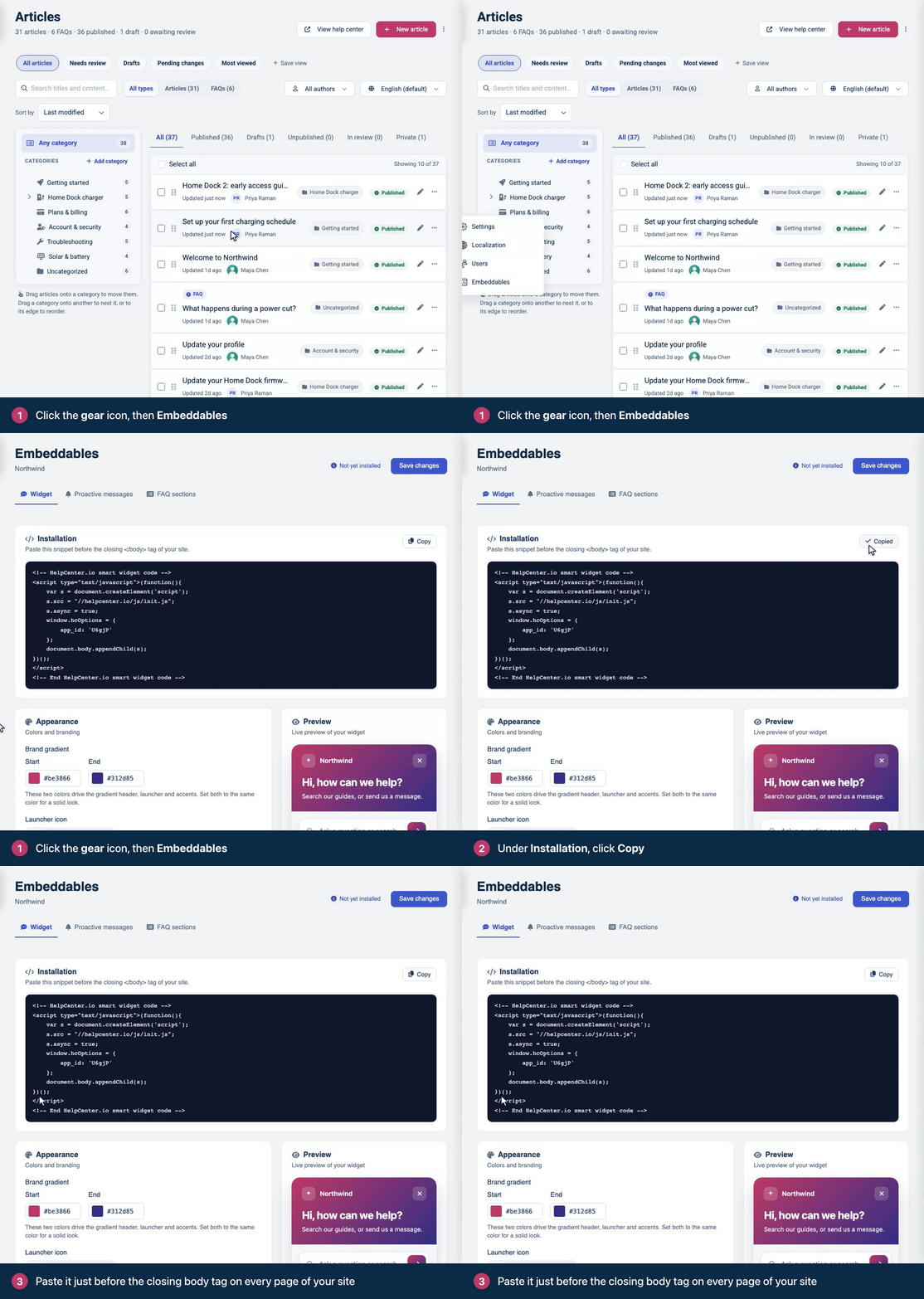
![Screen recording. Click the gear icon, then Embeddables. Under Installation, click Copy. Paste it just before the closing body tag on every page of your site.](https://helpcenter-io.s3.amazonaws.com/uploads/self/dnkcKwvNM82WIJwbatBgG2WBGCBrsWWw10BU6yip.gif)
The snippet you copy already contains your widget ID.

## The snippet

This is the snippet, with your widget ID in place of `YOUR_WIDGET_ID`:

```
<!-- HelpCenter.io smart widget code -->
<script type="text/javascript">(function(){
    var s = document.createElement('script');
    s.src = "//helpcenter.io/js/init.js";
    s.async = true;
    window.hcOptions = {
        app_id: 'YOUR_WIDGET_ID'
    };
    document.body.appendChild(s);
})();
</script>
<!-- End HelpCenter.io smart widget code -->
```

What each line does:

| Line | What it does |
| --- | --- |
| `s.src = "//helpcenter.io/js/init.js"` | Loads the widget's loader. The address is the same for every help center, including help centers on a custom domain. |
| `s.async = true` | Loads it without holding up your page. |
| `window.hcOptions = { … }` | Your options. `app_id` is your widget ID, five characters long. A help center has one widget, and one ID. |
| `document.body.appendChild(s)` | Adds the loader to the page body. The body must exist when the snippet runs, so put the snippet right before `</body>`, not in `<head>`. |

### Without an inline script

The two parts can also be separate: set `window.hcOptions` in your own script or bundle, then load `init.js` with a script tag. This form works with a Content Security Policy that doesn't allow inline scripts (see [Content Security Policy and allowed origins](https://developers.helpcenter.io/content/content-security-policy)).

```
<script>
  window.hcOptions = { app_id: 'YOUR_WIDGET_ID' };
</script>
<script src="https://helpcenter.io/js/init.js" async></script>
```

Set `window.hcOptions` before `init.js` runs, and keep both right before `</body>`: `init.js` picks up the article links and FAQ sections that are on the page when it runs.

## What happens when the page loads

1. `init.js` reads `window.hcOptions`, once. Changing the object afterwards has no effect.
2. It creates `window.hcWidget` straight away, unless `widgetEnabled` is `false`. The methods exist from this moment, but the widget doesn't take commands yet.
3. It binds the links with a `data-hc-article` attribute that are on the page now, and loads the FAQ sections that are on the page now.
4. It fetches the widget's configuration from `https://embed.helpcenter.io`, then adds the widget's frame to the bottom of your page.
5. The widget checks that your page's host is in **Embedding origins**. If it is, the widget renders and becomes ready: `hcWidget.isReady()` returns `true`, and `onWidgetReady` and every `hcWidget.onReady()` callback run.

Calls to `show`, `hide`, `setCategory`, `setHref` and `setHrefAndOpen` made before step 5 are lost. Only `trigger` and `onReady` wait for the widget. On a page whose host isn't in Embedding origins, step 5 never happens. To run code as soon as the widget takes commands, put it in `onWidgetReady`; see [Widget JavaScript API](https://developers.helpcenter.io/content/widget-javascript-api).

## Options

| Option | Type | Default | What it does |
| --- | --- | --- | --- |
| `app_id` | string | Required | Your widget ID. |
| `position` | string | Bottom right | `'bottom-left'` puts the launcher, and the widget when it opens, in the bottom-left corner. Any other value keeps the bottom-right corner. |
| `lang` | string | Your default language | One of your help center's languages, such as `'es'`. The widget lists only articles translated into that language, and takes its texts from your translations of the widget's buttons and labels (see [Translate buttons and labels](https://self.helpcenter.io/content/interface-translations)); texts you haven't translated show in English. Searches typed in the widget still match your default language. A code that isn't one of your languages, or `'default'`, gives the default language. |
| `category` | number | None | A category ID. The home screen lists up to seven published articles from that category and its subcategories, instead of your most viewed articles. A category visitors can't see gives an empty list; an ID that doesn't exist gives the most viewed articles. |
| `href` | string | None | An article path, `'/content/<slug>'`, with the slug in your default language. On a public help center the value must start with `/content/` (a full URL is ignored), and the widget shows the article when the visitor opens it. On a private help center, the widget opens on the article by itself once the reader is signed in. |
| `showButton` | boolean | `true` | `false` hides the launcher. The widget opens only from your code (`hcWidget.show()`, `hcWidget.setHrefAndOpen()`) or from a `data-hc-article` link. It then opens as a full-height panel, 460 pixels wide, at the right edge of the page (the left edge with `position: 'bottom-left'`), or full screen on screens narrower than 450 pixels. Proactive messages don't show. |
| `widgetEnabled` | boolean | `true` | `false` loads no widget: no frame, no `window.hcWidget`, and `data-hc-article` links stay ordinary links. FAQ sections on the page still load. |
| `jwt` | string | None | The first sign-in token for a private help center. See [Sign readers into the widget with a JWT](https://developers.helpcenter.io/content/widget-jwt). |
| `onAuthExpired` | function | None | Returns a new sign-in token, as a string or a Promise of one, each time the widget needs one. Use it together with `jwt`. |
| `onContactsRequest` | function | None | Called, with no arguments, when a visitor asks to contact you, instead of the widget's own contact form. See [Handle contact requests yourself](https://developers.helpcenter.io/content/widget-custom-contact). |
| `onWidgetReady` | function | None | Called once, with no arguments, when the widget is ready for commands. |

An example with several options:

```
window.hcOptions = {
  app_id: 'YOUR_WIDGET_ID',
  position: 'bottom-left',
  lang: 'es',
  onWidgetReady: function () {
    console.log('The HelpCenter.io widget is ready');
  }
};
```

A few things come from your dashboard, not from the snippet: the widget's colors, launcher icon, greeting and texts (see [Match the widget to your brand](https://self.helpcenter.io/content/widget-appearance)), and its proactive messages (see [Invite visitors with proactive messages](https://self.helpcenter.io/content/proactive-messages)).

To suggest related articles, which it lists under **Can this help?**, the widget sends the visible text of your page to HelpCenter.io when it loads. Setting `category` or `href` turns this off.

## Single-page apps

The widget works in single-page apps. Keep these in mind:

- **Load it once.** Put the snippet in your app shell, not in a component that renders on each route. Every run of the snippet adds another widget.
- **It stays through route changes.** The widget and its state survive client-side navigation. Because `hcOptions` is read once, change what the widget shows with its methods, for example `hcWidget.setCategory()` on each route. See [Open the widget from your own UI](https://developers.helpcenter.io/content/open-the-widget-from-your-ui).
- **Links you render later aren't bound.** `data-hc-article` links added after `init.js` ran behave as ordinary links. The same page shows a click handler that covers them.
- **Page suggestions are computed once**, when the widget loads.
- **Proactive messages follow the route.** While your widget has active proactive messages, each change of the page's address counts as a new page view for their rules.
- **Use `addEventListener` for resize handlers.** `init.js` assigns `window.onresize`, which replaces a handler you assigned there, and the other way round.
- **Reload to start over.** The widget has no method to remove or reset it. When a user signs out, or another user signs in, reload the page.

## One widget per page

Add the snippet once per page. A page has one `window.hcOptions` and one `window.hcWidget`: a second copy of the snippet adds a second widget, and the two respond to each other's commands. To show another help center's widget, use a different page.

## FAQ sections

The same script renders FAQ sections: a `<div class="hc-faq-section" data-id="YOUR_SECTION_KEY" data-type="custom"></div>` (or `data-type="full"`) anywhere on a page that has the widget snippet. `init.js` loads the sections that are on the page when it runs. Set `widgetEnabled: false` to show sections without the floating widget, and `lang` to show them in another language, with the FAQs translated into it. FAQ sections are for public content. You create sections, and copy their markup, under **Embeddables** → **FAQ sections**; see [Embed FAQ sections on your website](https://self.helpcenter.io/content/faq-sections).

## Troubleshooting

**The launcher doesn't appear, and the console says "Parent domain is not in the allowed list."** Your page's host isn't in **Embedding origins**. Add the host the message names; see [Choose which websites can show the widget](https://self.helpcenter.io/content/embedding-origins).

**Nothing loads, and `window.hcOptions` is `undefined` in the console.** The snippet didn't run: your tag manager hasn't published it, or your Content Security Policy blocked it.

**Nothing loads, and the console shows a TypeError, such as "Cannot read properties of null (reading 'appendChild')" in Chrome.** The snippet is in `<head>`, where the page body doesn't exist yet. Move it right before `</body>`.

**The frame loads, but the widget never appears.** Check `app_id`. With an ID that doesn't exist, the browser's Network tab shows the request for `https://embed.helpcenter.io/widget/<id>` answering `410 Gone`:

```
{
  "status": "error",
  "message": "Widget not found.",
  "code": "WIDGET_NOT_FOUND"
}
```

**The widget works in Chrome and Safari but not in Firefox, and Firefox's console says "Parent domain not found. Cannot render the widget."** Your page sends `Referrer-Policy: no-referrer` or `same-origin`. See [Content Security Policy and allowed origins](https://developers.helpcenter.io/content/content-security-policy).

More causes, from the account owner's side, are in [The widget doesn't show up](https://self.helpcenter.io/content/widget-not-showing).

## Related

- [Widget JavaScript API](https://developers.helpcenter.io/content/widget-javascript-api)
- [Open the widget from your own UI](https://developers.helpcenter.io/content/open-the-widget-from-your-ui)
- [Content Security Policy and allowed origins](https://developers.helpcenter.io/content/content-security-policy)
- [Sign readers into the widget with a JWT](https://developers.helpcenter.io/content/widget-jwt)
